The Overwhelm Recovery ProtocolWellness & Routines · ~5 min
About this template · Updated September 2026
An expense tracker is the plainest money tool there is. You write down what you spend, you add it up, and you look at the result. The hard parts are keeping it going for a whole month and learning something from the totals once the month is over. This page is built around both. Each purchase takes a few seconds to file in one of eight kraft pockets, the pockets keep their own totals, and before the month begins you make a guess that the receipts will later check.
Most people carry a rough picture of where their money goes, and the picture tends to be generous. In four studies of personal spending forecasts, Johanna Peetz and Roger Buehler found that people predicted spending substantially less in the coming week than they went on to spend. The gap traced back to the wish to save: a stronger savings goal pulled the forecast down, yet it had no bearing on the spending itself.
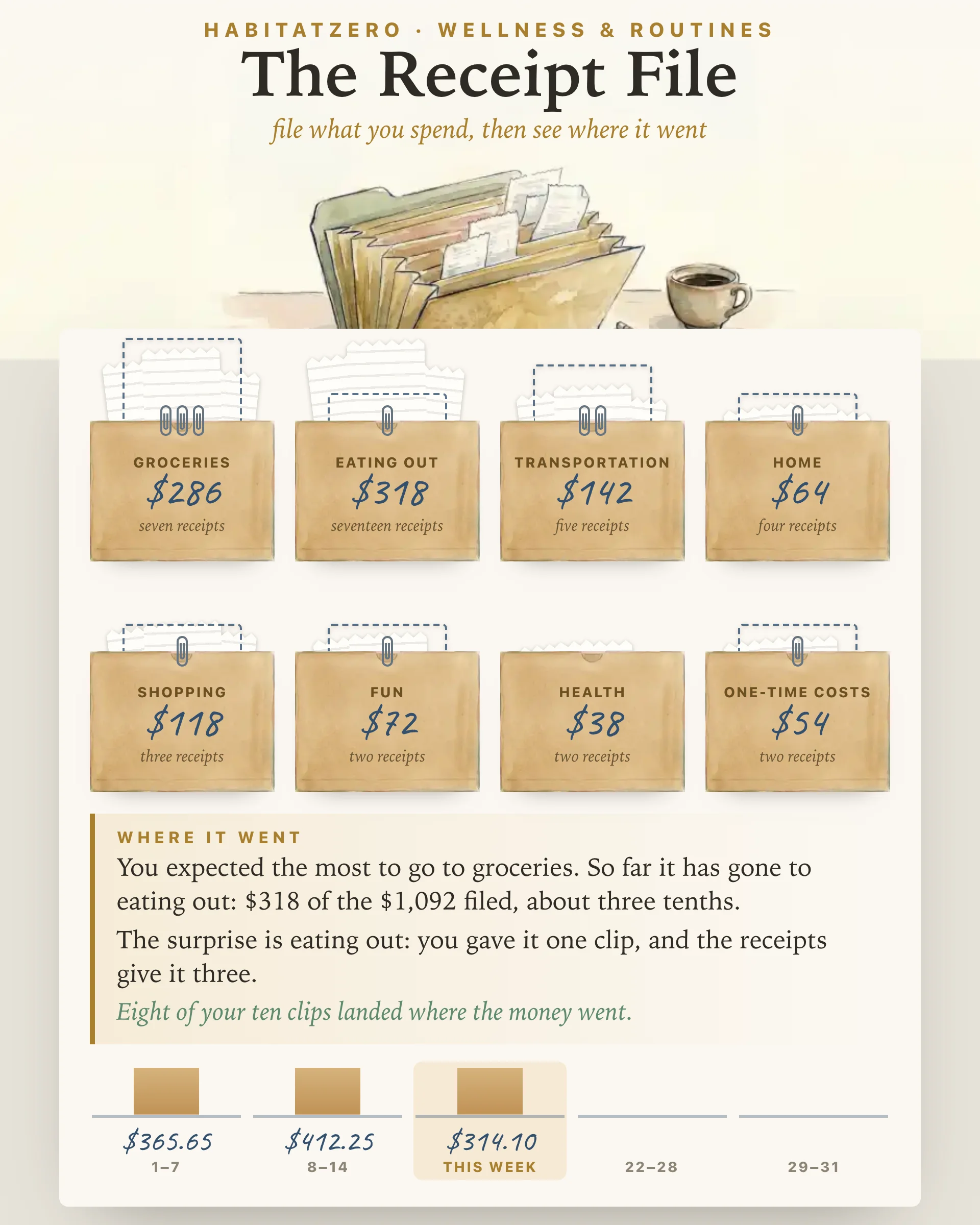
So the page asks for your guess first. You get ten paper clips, one for each tenth of the month's spending, and you clip them onto the pockets you expect to fill. While you place them, the pockets turn face down, so a total you already filed cannot steer the guess. From then on, each pocket shows your clips as a dashed outline with the real receipts rising beside it.
The pockets are groceries, eating out, transportation, home, shopping, fun, health, and one-time costs. Eight is enough to be useful and few enough that you never stall over where a coffee goes.
The last pocket earns its place. Across seven studies, Abigail Sussman and Adam Alter showed that people predict ordinary spending fairly well but underestimate their exceptional purchases, partly because each gift, repair or celebration feels like a one-time event rather than part of a pattern. The fix they tested was to think of those costs as one larger group. A single pocket for them does exactly that, and by the third week you can see what the exceptions add up to.
Bills that arrive every month, like rent or the phone, belong somewhere else. They are easier to follow on The Bill Ledger, which keeps each one on its own line with a tick for every month it is paid. This file is for the day-to-day spending that no statement warns you about.
Tap the pocket a purchase belongs in, write the amount, add a word or two if you like (each pocket offers four to tap), check the day, and press file it. The receipt drops into its pocket, the pocket's total updates, and the purchase lands on the monthly sheet under its day.
Three readings build as you go. The pockets show each share of the month as a stack of slips. The week strip adds up every seven days, so a heavy stretch shows up while there is still time to change the rest of the month. And the reading under the pockets says, in plain sentences, where the most has gone, which pocket surprised you, and how many of your ten clips landed where the money actually went.
The file holds up to one hundred fifty receipts, about five a day. An identical receipt filed twice in a row asks for a second tap in case your thumb bounced, and taking a line off the sheet takes two taps as well.
The print button turns the file into a monthly sheet: the pockets with their totals, the week strip, and every receipt in order, followed by blank ruled lines. Print it when the month closes to keep a record, or print it blank on the first and fill it in by hand at the kitchen table.
Writing things down is not magic, but it is not nothing either. A meta-analysis of 138 experiments led by Benjamin Harkin found that prompting people to monitor their progress helped them reach their goals on average, and the effect was larger when the information was physically recorded or shared with others.
What a tracker will not do is decide anything for you. It cannot tell you whether a number is too high for your life, and nothing on this page is financial advice or a promise about how your month will turn out. It hands you an honest picture and leaves the choices with you.
Start on the first of a month if you can, though any day works; the file runs to the end of the month and then offers a fresh one. File in one sitting each evening, straight from your receipts or your banking app. When the month ends, read the pockets against your clips. If you want to turn those numbers into a plan, The 50/30/20 Budget sorts your costs against a simple rule. If one pocket startled you, a short run of The No-Spend Challenge is a gentle way to test how much of it you really need.
Five things cover it: the day, the amount, a category, a word or two about the purchase, and running totals by category and by week. This one files every purchase into one of eight pockets, keeps those totals as you go, and prints the month as a ruled sheet with spare lines for writing by hand.
Make the habit smaller than the month. File the day's purchases in one sitting each evening, straight from your receipts or your banking app, and let a word or two stand in for a full description. A minute a night is far easier to keep up than a Sunday spent rebuilding seven days from memory.
Few enough that you never stop to decide. This sheet uses eight pockets: groceries, eating out, transportation, home, shopping, fun, health and one-time costs. The last one gathers gifts, repairs and fees, which feel rare one at a time but together take a real share of most months.
No. A budget plans money you have not spent yet, while a tracker records what already happened. Many people track first, because a month of real numbers makes the plan that follows far more honest. Bills that repeat every month are easier to follow on a bill ledger of their own.
Yes. Once the file is yours in HabitatZero, its print button turns it into a monthly sheet with the pockets, the week totals and every receipt in order, plus blank ruled lines for more. Personalizing it costs nothing, and the finished month pictured on this page shows what a filled file looks like.
By the team behind Fabulous, the science-based self-care app used by over 30 million people.