The Overwhelm Recovery ProtocolWellness & Routines · ~5 min
About this template · Updated September 2026
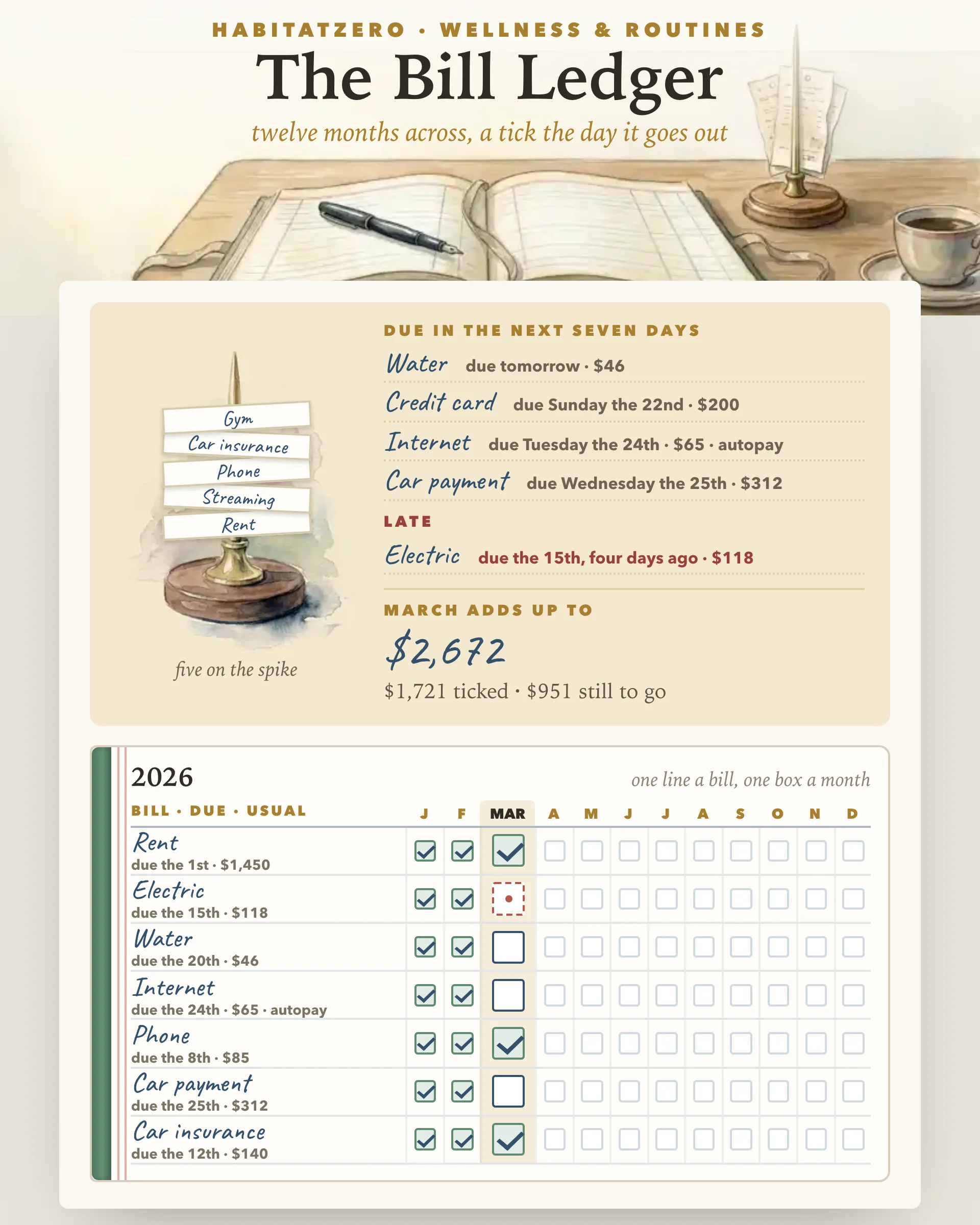
A bill tracker is the least glamorous page in any planner and the one that quietly earns its keep. The idea is older than the spreadsheet: the household ledger, one line per bill, columns marching across the year, a mark in the column when the money had gone out. This page is that ledger, with the arithmetic done for you.
Rent, power, water, the phone, insurance, a car, a card or two: every recurring bill brings its own due day, and the due days land across the month with no pattern at all. Holding them in your head works until the month something else needs your attention, which is exactly the month one slips.
The Consumer Financial Protection Bureau's financial empowerment toolkit includes a bill calendar for exactly this reason. Its advice is blunt: being late even by a few days usually costs a fee and can leave a mark on your credit record, so gather every bill you pay in a month, write down the day each must be sent, include the ones that are paid automatically, and put the calendar where you will see it every day. That last line is the one most trackers fail. A sheet in a drawer is a sheet you check in April.
You start by putting bills on lines. The page offers the usual suspects as tap-to-add chips, and you can write any it did not guess. Fourteen lines is the whole page, so only what genuinely recurs earns one. Each bill then gets two facts: the day of the month it is due, picked on a small calendar, and its usual amount, set by tapping a chip or nudging the figure by five. If a bill leaves the account on its own, flip its autopay switch.
Across from every bill sit twelve boxes, one per month, with this month's box drawn larger and its column shaded. Tap the box the day the money goes out, and the bill lands on the spike at the top of the page. Tap a ticked box again and the page asks before it clears anything. A box that stays empty past its due day goes dashed red, so a missed month is visible from across the room.
Beside the spike, three readings are recomputed every time you touch the ledger: what falls due in the next seven days, with the weekday and the amount; what is late, and by how many days; and what the month adds up to, split into what is ticked and what is still to go. Each finished month with every box ticked adds to a run the page counts for you.
Automatic payments prevent a lot of late fees, and they also make bills invisible, which is how a subscription nobody uses keeps running for three years. The CFPB is clear that you have the right to stop an automatic payment, even one you previously agreed to, and equally clear that canceling the payment does not cancel what you owe. On this ledger, autopay bills stay on the page and still get a tick from you when you see them leave. The switch changes what the desk says about them, not whether you look.
There is a good reason to keep looking. A study in the Review of Financial Studies found that simply asking people survey questions about overdraft fees made them less likely to incur one that month, and repeated surveys kept the effect going for up to two years. People managed it partly by canceling automatic recurring withdrawals. Attention itself moved the number. A ledger you glance at each week is a standing version of that nudge.
The CFPB's 2022 report on credit card late fees put the total charged by card issuers at about twelve billion dollars in 2020, down from a peak above fourteen billion the year before, and found that the fees land hardest on cardholders with subprime scores and on low-income neighborhoods. The fee is only the visible part, too: the same bill calendar warns that a late payment can put a negative entry on your credit record.
None of that is advice. This page does arithmetic. It adds up the month, subtracts what is ticked, and counts days. What you do with the number is yours.
Set the ledger up on a quiet evening with the statements open, ideally just after the month's first bill lands. After that it wants ten seconds at a time: a tick when money goes out, a glance at the desk before payday. If the bills themselves are new to you, the First Apartment Checklist covers the accounts you will be opening, and the Monthly Reset is a natural moment to check that every box from last month is ticked. When the season piles one-off spending on top of the recurring kind, The Christmas Budget keeps that pile on its own page rather than on this one.
A ledger does not make the bills smaller. It makes sure none of them arrives as a surprise.
One line per recurring bill with three facts on it: who you pay, the day of the month it is due, and roughly how much it usually is. After that you want a box for each month so a glance tells you whether it has gone out. This ledger keeps those three facts on the left and twelve boxes across, and adds the arithmetic a sheet of paper cannot do.
Put the due dates somewhere you look every day, and mark a bill the moment it is paid rather than at the end of the month. The Consumer Financial Protection Bureau suggests a bill calendar for exactly this reason, and the desk at the top of this page does the looking for you: it names what falls due within seven days and flags anything whose date has passed unticked.
Yes. An automatic payment still needs money in the account on the day, and it still deserves a tick when you see it leave. On this ledger you mark a bill as autopay so the desk can tell you how much of the month goes out by itself, without letting it disappear from view.
Most billers add a late fee, and a payment reported as missed can show up on your credit report. This page does not give financial advice. It only makes the due date visible early and counts the days once it has passed.
You can look over the filled example on this page as it is. Entering your own bills and keeping the ticks from month to month happens in HabitatZero, which costs nothing, and the ledger prints cleanly if you want a paper copy on the fridge.
By the team behind Fabulous, the science-based self-care app used by over 30 million people.