The Overwhelm Recovery ProtocolWellness & Routines · ~5 min
About this template · Updated November 2026
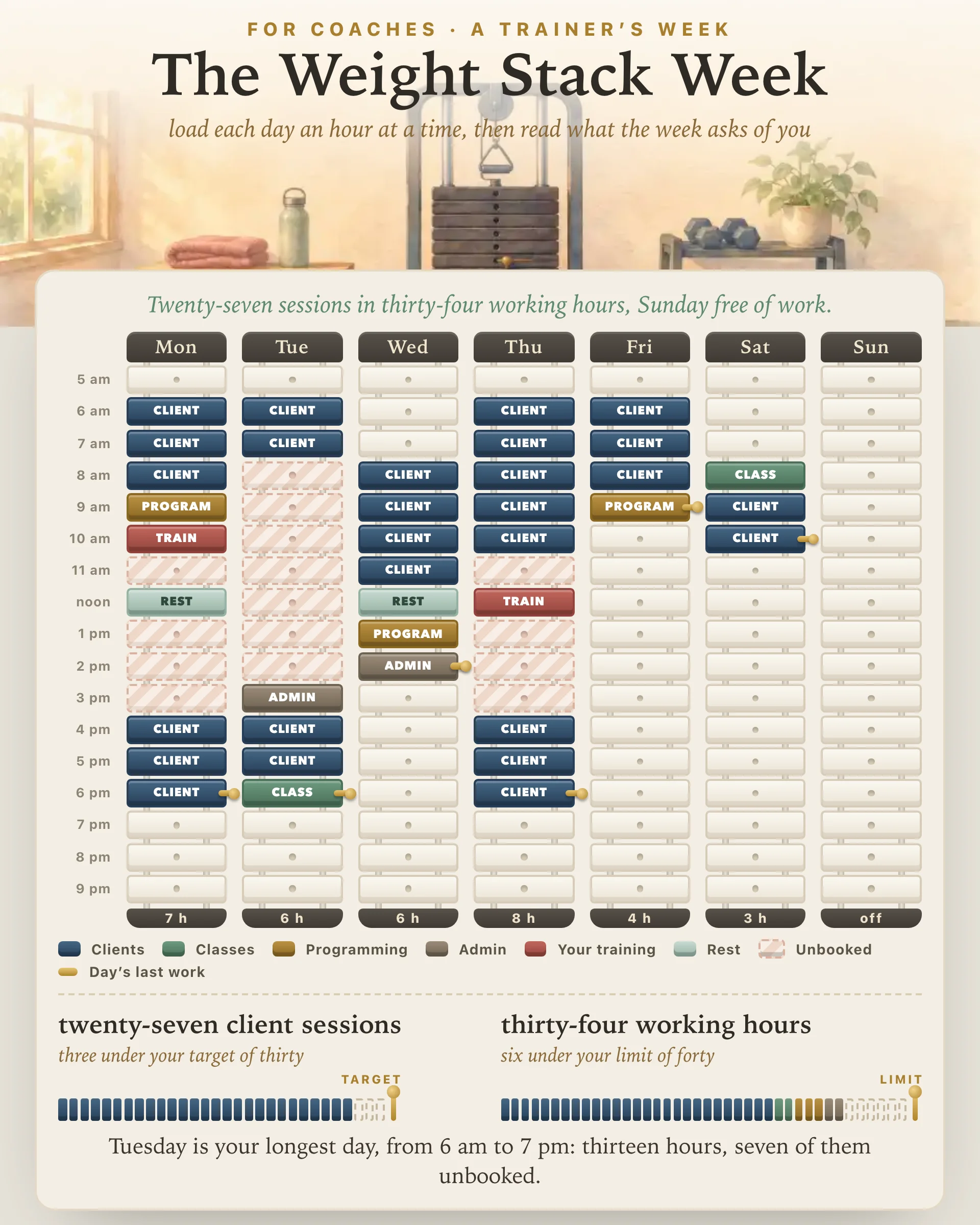
Most trainers don't design the shape of their week so much as inherit it. Clients book around their own jobs, so requests bunch up before work, over lunch and after five, and the hours between them sit open. Saying yes to each request in turn is how a day starts at 6 am and ends after dark with a handful of sessions in it. This page lets you see that shape before it settles on you.
The page lays your week out as seven weight stacks, Monday to Sunday. Each stack holds seventeen plates, one for every hour from 5 am to 10 pm. Pick a block at the top and tap the hours it fills:
A second tap on a plate empties it, and the Empty block clears whatever an hour holds. A blank week can also start from one of three shapes, which you then change until it matches the week you actually work.
Two marks appear by themselves. A brass pin goes into each day's last working plate, the way a selector pin sets how much of a stack you lift. And any empty hour between a day's first and last working plate turns striped, because that is time you are at work, or near it, without being booked.
Client sessions counts your client plates. Tell it whether your sessions run thirty, forty-five or sixty minutes: a plate holds one session of sixty or forty-five minutes, with the rest of the hour to turn around, or two sessions of thirty. Slide in a weekly target and the page draws a row of small plates with a pin at your number, hollow where you still have room and outlined where you have gone past it.
Working hours adds up clients, classes, programming and admin, and measures them against a limit you set. Your own training and rest stay out of that total on purpose. They sit on the stack so they are protected, not so they count as work.
Below the meters come a few plain lines: your longest day and its unbooked hours, your longest run without a break, the days with no work, and the time programming, admin, your training and rest hold. The page never says what any of these numbers ought to be.
A day with sessions at 6 and 7 am and again at 4 and 5 pm holds four hours of work but spans twelve. The stripes make that gap hard to miss. What you do about it is your call. You might put programming and admin in the middle, train there yourself, gather new clients at one end of the day, or decide that two long split days a week are fine and a third is one too many. The page only shows where the hours went.
Programming and admin get squeezed first, because they rarely have a fixed time. People tend to underestimate how long their own tasks will take, a pattern researchers call the planning fallacy, so work that waits for a free moment often spills into the evening. Plates at set hours are a simple correction, and they land in your working hours where you can see them.
The same goes for your own training. Work on implementation intentions found that plans which name the situation, such as when and where you will act, make follow-through more likely than a general intention does. "Thursday at noon, upper body" is that kind of plan. "Sometime this week" is not.
The longest-run reading counts working hours in a row with no rest, training or empty plate between them. A review and meta-analysis of micro-breaks found that short breaks during work brought small gains in vigor and small drops in fatigue, with no clear effect on overall performance, and its authors suggest that recovering from very draining work may take more than ten minutes. It doesn't say how long your breaks should be. The reading only names your longest stretch, and the decision stays with you.
Every client plate is a count. Nothing on the page asks for a client's name, contact details, health information or results, and nothing about a client is stored. A printed week shows the seven stacks with each block labeled, a key and the load readings, ready for a wall or a clipboard.
Load it at the start of a week, or before you agree to a new regular slot, and watch what that slot does to your longest day and its stripes. If you are still shaping the business behind the schedule, Your Coaching Business Plan walks through the first steps, Three Coaching Packages sets your offers side by side, and the classes on your stacks can start from The 14-Day Group Challenge.
It tends to follow your clients' free time, so bookings bunch up before the workday, around lunch and in the evening, and weekends fill quickly. That can stretch one day from early morning to night with an empty middle, which is why this sheet stripes the unbooked hours between your first and last working block.
This sheet won't name a number. Your session length, the classes you teach, the programming and admin behind every client and the energy you bring all move the answer, so you set a target and a limit yourself and the stacks show how the week compares with both.
Give each one plates at fixed hours, the way you would book a client. Work saved for whenever a gap opens usually runs longer than expected, and the load card counts programming and admin as working hours so the time behind your sessions stays in view.
Yes. Printing gives you the seven stacks with every block labeled, a key to the colors and the load readings underneath, while the buttons and sliders stay off the paper.
It costs nothing, and it holds only hours and counts: no client is named and nothing about a client is stored. Tap Personalize to keep the week in a free Salon account, made by the team behind Fabulous, and adjust it whenever your bookings shift.
By the team behind Fabulous, the science-based self-care app used by over 30 million people.