Reading JournalStudy & Learning · ~4 min
About this template · Updated September 2026
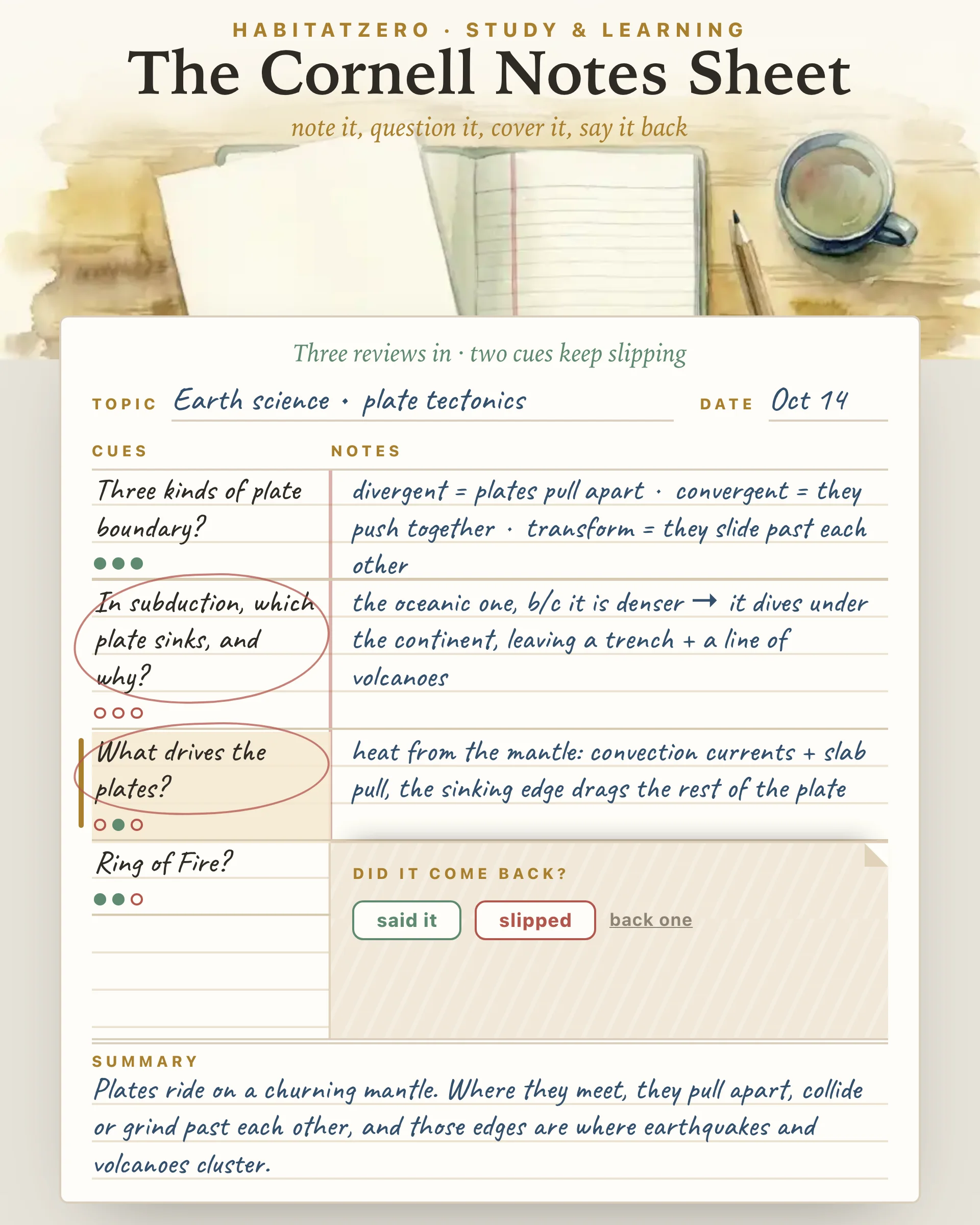
The Cornell note-taking system is Walter Pauk's. He taught education at Cornell University and laid the method out in his book How to Study in College, and Cornell's Learning Strategies Center still credits him and teaches it to students today. This sheet is an independent interactive version built on his layout. It has no tie to Cornell University or to the publishers of Pauk's book, and neither has reviewed or endorsed it.
Cornell's one-page handout on the system draws the sheet as three zones: a cue column two and a half inches wide down the left, a note-taking column six inches wide on the right, and a strip two inches deep across the bottom for a summary. Each zone belongs to a different hour of your week. The notes column is for class, when you are listening and writing fast. The cue column is for later that day, when you turn what you wrote into questions. The summary is for the end, when you ask what the whole page was actually about.
The clever part is where the questions sit. Because they run down the left and the answers run down the right, a plain sheet of paper laid over the right-hand column turns your own notes into a quiz. The handout's recite step asks for exactly that: cover the notes, look only at the cues, and say the answers aloud in your own words. After that come reflecting on what the facts mean and how they connect, and a review of at least ten minutes every week with all your earlier sheets.
Type a note and press Enter, and it lands on the next ruled line in handwriting. Keep the lines short, the way Pauk's telegraphic style asks, and tap the shorthand under the line (an arrow, an equals sign, b/c, e.g.) when a symbol is faster than a word. A sheet holds ten notes and tells you when it is full.
After class, write a cue beside each note: the question that note answers, or the one word it hangs on. Enter walks you down the cue column and drops you into the summary strip at the bottom, where two or three sentences in your own words close the page.
Then press cover the notes. A paper cover slides over the notes column and stops beside your first cue. Answer it out loud, press slide down to check, and the cover drops one note so you can see whether you had it. Mark said it or slipped, and the cover waits at the next cue. When the last cue is marked, the review is filed and every cue gets a dot, filled when you said it and open when it slipped. If you run out of time, stop here files whatever you recited so far.
The dots are where the sheet earns its place. A cue that has slipped in two reviews, the most recent one included, gets a pencil circle and joins the list of cues that keep slipping under the sheet. The example above is an earth science sheet on plate tectonics, three reviews in and partway through a fourth. Two cues wear circles because they have not stuck yet, subduction and what drives the plates, and the cover has just slid down to check the second of them. Those two are where the next ten minutes should go.
Printed empty, the sheet comes out as a blank letter-size Cornell page with lines for your name, class, topic and date. Printed after a few reviews, it keeps your handwriting and the circles.
Tests of the Cornell layout itself are few and small, and they have not settled whether the format on its own lifts grades. A Rutgers study that taught sixty eighth graders the method, together with a review routine, described its own findings as inconclusive.
The firmer evidence concerns the habits the sheet is built around. In their review of ten common study techniques, Dunlosky and colleagues gave their highest rating to practice testing and to spacing study out over time, and covering your notes to answer cues each week is both at once. The same review rated summarization low: it helped some students on some tests, but only under fairly narrow conditions. So treat the summary strip as a quick check that you understood the page, and let the covered reviews do the heavy lifting.
Start a fresh sheet for each lecture, chapter or video you want to keep; the layout suits any class that hands you explanations to remember. Write the cues on the same day, while you can still tell what you meant, and schedule the covered reviews rather than waiting for the week before the test.
When exams get close, carry the circled cues from each sheet into the Study Guide Builder, and use the Exam Planner to spread your remaining reviews across the days you have left. If you are not sure this method fits a subject at all, The Study Techniques Cabinet will suggest a few that might suit it better.
It is a single page with a heading line and three working zones. A narrow cue column runs down the left, a wide notes column fills the right, and a summary strip crosses the bottom. The handout from Cornell's Learning Strategies Center gives the cue column two and a half inches and the notes column six, together the full width of a letter-size sheet, with a summary strip two inches deep below them.
Cornell's handout, adapted from Walter Pauk's book, lists five steps: record, questions, recite, reflect and review. You take notes on the right during class, write questions on the left soon afterward, cover the notes and answer those questions aloud, think about how the ideas connect, then spend at least ten minutes a week going back over your sheets.
Yes. Open this sheet in HabitatZero and print it before writing anything, and it comes out as a blank letter-size Cornell page with Name, Class, Topic and Date lines, a ruled cue column, a notes column and a summary box. Choosing Save as PDF in the print dialog keeps it as a file. A sheet you have already filled prints with your notes in handwriting and the slipping cues still circled.
The layout on its own has only small studies behind it, and their results disagree. The habits it builds in are better supported: answering questions from memory and returning to them over several weeks both rank near the top of research reviews of study techniques. Summaries have weaker backing, since they helped some students on some tests and not others.
The public page shows a finished sheet you can read through but not edit. Taking your own notes, writing cues, covering them for reviews and keeping the circles from one week to the next all happen after you personalize the sheet in HabitatZero, which costs nothing.
By the team behind Fabulous, the science-based self-care app used by over 30 million people.