Reading JournalStudy & Learning · ~4 min
About this template · Updated July 2026
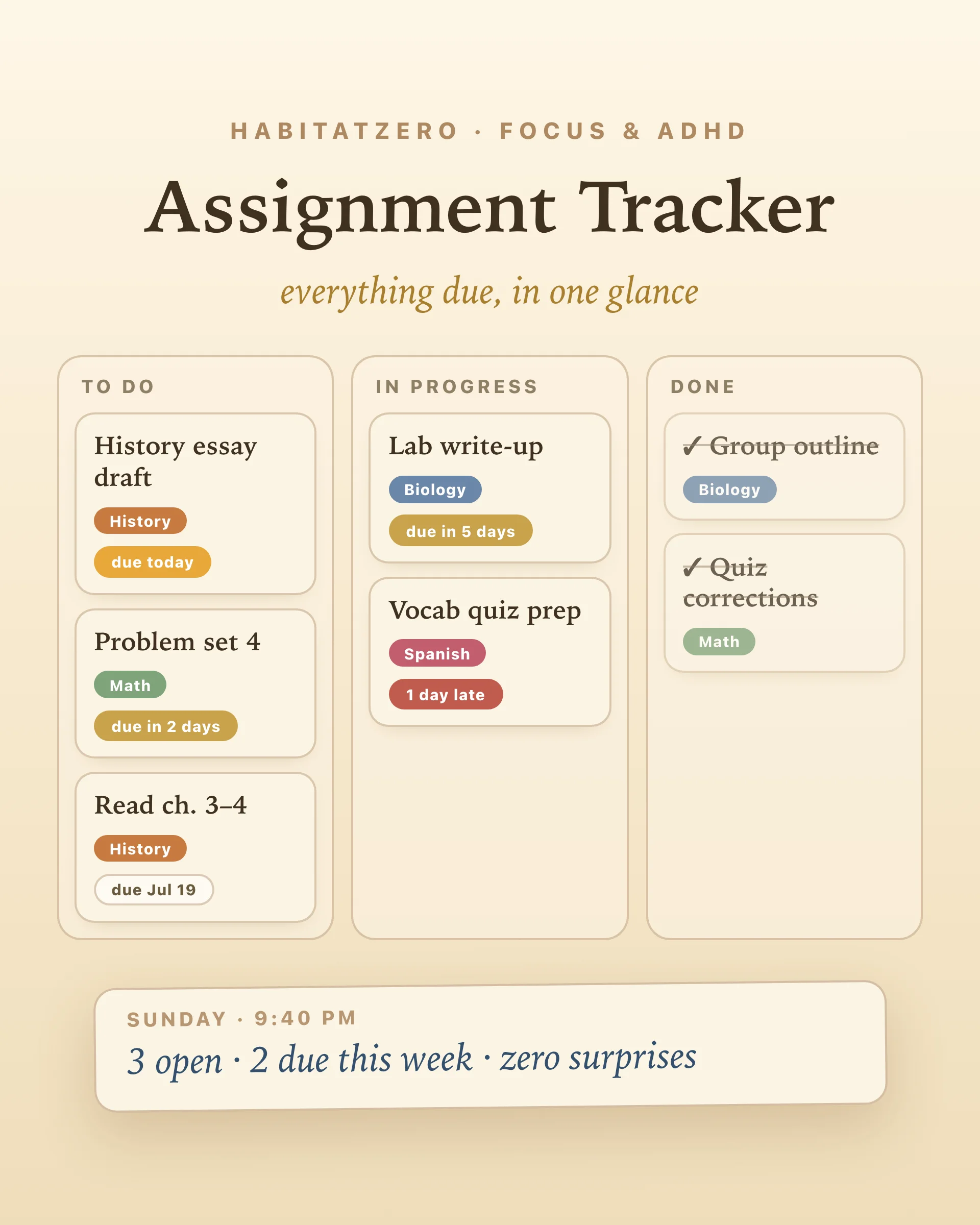
The bad moment isn't the essay. It's Sunday, 9:40pm, when a cold thought surfaces: wait — what's actually due this week? And then the frantic archaeology begins: three syllabi, two portals, a photo of a whiteboard, a text from someone in your lab group. The work was never the problem. The untracked work was.
This is a tracker built for that moment — or rather, built so that moment stops happening. One board, every assignment, three columns, and badges that do the deadline math so your brain can stop running it in the background.
Add everything. Title, subject, due date, done — five seconds per assignment. Don't organize while you add; the board sorts every column by deadline automatically. The goal of the first sitting is completeness: when the last syllabus item is in, you'll feel the specific relief of a brain that no longer has to be the database.
Read the badges. Every card carries a living due-date badge: red for overdue, amber for due today, gold for this week, quiet parchment for everything further out. The column of badges is the whole point — one glance replaces the mental re-scan you've been doing between classes all semester.
Move cards. To do → in progress → done, with a tap. Filter by subject when it's crunch week for one course. And leave the done column alone for a while before clearing it: research on motivation is unambiguous that visible progress feeds the next push, and a stack of finished cards is the cheapest motivation you'll ever own.
Psychologists have a name for the Sunday-night ambush: the planning fallacy. In the classic studies, students predicted their assignments would take far less time than they actually did — even when they'd been wrong the same way on the last assignment. Optimism about deadlines isn't laziness; it's the brain's default setting.
The fix that holds up in research isn't "try harder" — it's externalizing: getting tasks out of your head and into a system that shows dates against reality. Related work on implementation intentions finds that people who decide when and where they'll act on a task follow through at dramatically higher rates. The board handles both halves: the badge shows you reality, and moving a card to in progress is a tiny "I'm starting this now" decision made visible.
A to-do list holds assignments; a board holds their state. The difference matters at week six, when a list has become forty lines of undifferentiated guilt. Three columns mean you always know the answer to the only three questions that matter: what's coming, what's open, what's handled. That third column — finished work you can see — is the reason board-trackers survive semesters while list-trackers die by October.
Plenty of assignment trackers are Google Sheets or Excel templates, and if you're the person whose spreadsheet is still alive in November, keep going — it works. But a spreadsheet needs setup, a days-remaining formula, and the discipline to reopen a file. This board needs none of that: the countdown math runs itself, the sorting runs itself, and it's one tap away on your phone the moment an assignment is announced — which is the exact moment trackers live or die.
Tracking tells you what; sometimes the wall is starting. If a card has been staring at you from the to-do column for days, Deal With Your Brain is built for exactly that stuck moment. When a big assignment needs real hours, block them with the Time-Blocking Daily Planner. And if the whole list has tipped into too-much, run the Overwhelm Recovery Protocol first, then come back to the board.
Five minutes of adding, one glance a day. That's the entire system.
One place, every assignment, sorted by due date — the method matters less than the completeness. A board works better than a list for most students because it shows three things at once: what's waiting, what's started, and what's finished. The finished column isn't decoration; visible progress is what keeps the system alive past week two.
Add each assignment with a title, a subject, and a due date. Cards line up in three columns — to do, in progress, done — each sorted by deadline, with a color badge showing urgency: red for overdue, amber for today, gold for this week. Tap the arrows to move a card forward, filter by subject when you need one course at a time, and clear finished cards whenever the done pile has done its motivating.
This one is free, runs in your browser, and needs no signup or email. Add your real assignments and it works immediately; in the Fabulous app the same board saves and syncs so it's waiting on every device.
No — and honestly, that's the point of this page. A spreadsheet tracker needs setup, formulas for the days-remaining math, and discipline to reopen the file. This board does the sorting and the countdown math itself and lives one tap away in your browser. If you love spreadsheets they absolutely work; if the spreadsheet keeps dying by week three, try the board.
Both. Subjects are free-form, so 'AP Bio' and 'Organic Chemistry II' are equally at home, and the board doesn't care whether a card is a worksheet or a term paper. For heavy college semesters, the subject filter keeps one course in view during crunch weeks.
Yes — the columns stack vertically on small screens and every action is a tap: no dragging required. Adding an assignment the moment it's announced, from your phone, is the single habit that keeps the tracker honest.
By the team behind Fabulous, the science-based self-care app used by over 30 million people.