Reading JournalStudy & Learning · ~4 min
About this template · Updated September 2026
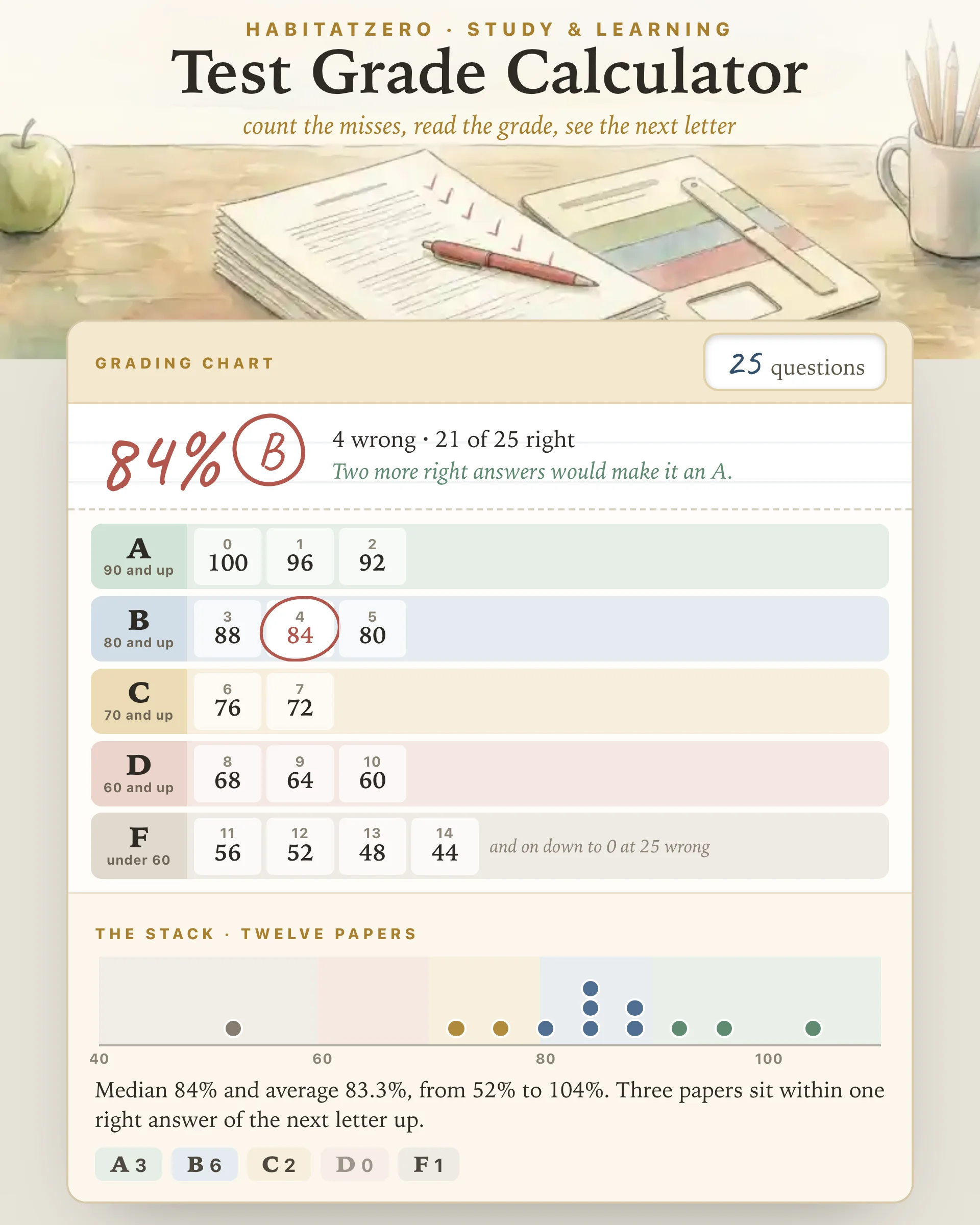
A test grade is a fraction in disguise. Count the questions you got right, divide by how many there were, and multiply by 100: miss 4 on a 25-question test and you kept 21, which is 84 percent. The arithmetic is easy. What trips people up is everything around it: half credit, extra credit, which letter an 84 earns at your school, and whether 89.5 counts as an A. This page handles all of that in one place, and when you are grading a whole pile, it shows how the class did.
Pick the test length at the top, either from the common ones like 20 or 25 or by typing your own, up to 200 questions or points. The chart underneath prints every possible score at once, grouped into letter bands, the way the paper grading charts in a teacher's desk drawer do. Tap the number wrong, or type it, and the grade appears in red pen with a line under it saying how many more right answers would reach the next letter.
Switch the count to points when questions carry different weights. Turn on half credit and the steppers and the chart move in halves, and a half point you type stays a half point. Extra credit is added to what was earned, not to the total, so four wrong plus one extra credit question on a 25-question test is 22 out of 25, or 88 percent, and a strong paper can pass 100.
The percent is math. The letter is policy. Florida's statute for public middle and high schools puts an A at 90 through 100 percent and a B at 80 through 89, then a C at 70 through 79, a D at 60 through 69 and an F below that. The federal High School Transcript Study converts numeric grades with those same bands, but only when a school's own documents give no other letter equivalents, and its authors note that grades vary across schools even more widely than course credits do.
So the page gives you three choices. The straight scale above is the default. The plus and minus option splits each band, with an A− from 90, a B+ from 87 and so on down to a D− from 60. The third option takes your school's own four cutoffs, for the teacher whose A starts at 93.
Rounding is the other quiet variable. Florida writes its bands in whole percents, so a score like 89.6 lands in the gap between them, and the district's rounding rule settles it. This calculator rounds to the nearest whole percent, halves up, before it picks a letter. If your school keeps the decimals, switch rounding off. Either way, when rounding is what changed the letter, the page tells you so.
Teachers can set the test length once and then work through the pile: tap the number wrong, add the paper to the stack, and move on to the next one. The stack draws each paper as a dot on a strip shaded by letter and reports the median, the average and the range. The median is the paper in the middle of the pile, and it is often the more honest summary for a single class, because one very low score drags the average down while barely moving the median.
The stack also counts how many papers sit within one right answer of the next letter up. When that number is large, a single question may have tripped up a lot of students, which is worth a second look before anything goes in the gradebook. Papers are numbered, never named, and each one keeps its own misses and extra credit, so correcting the test length afterward regrades the whole pile.
A grade tells a student where they landed, not what to do next. In a classic study of fifth and sixth graders, students who received comments alone showed more interest and performed better on later tasks than students who received grades, and grades paired with comments did no better than grades by themselves. If you are handing papers back, a short note naming one strength and one next step, the way Glow and Grow lays it out, carries information the number cannot.
For students, the missed questions are the most useful part of a returned test. Pulling material back out of memory, which is what a test makes you do, strengthens retention more than rereading it, although the advantage shows up days later rather than minutes later. Rework each miss without looking at the answer key, then check yourself. The Active Recall Deck turns those misses into cards you can quiz yourself on before the next test.
Open it the day a test comes back, to read your grade and see how close you came to the next letter, or at the kitchen table with thirty papers still to grade. If the number at the top of the page stings more than it should, The Test Anxiety Answer Sheet is a calmer place to start before the next one.
Divide the number right by the number of questions and multiply by 100. Four wrong on a 25-question test leaves 21 right, and 21 divided by 25 is 0.84, so the grade is 84 percent. On a test scored in points, subtract the points taken off from the total first.
One widely used US scale gives an A from 90, a B from 80, a C from 70 and a D from 60, and anything under 60 is an F. Florida writes those bands into law for grades 6 through 12, and the federal High School Transcript Study converts grades with them when a school lists no other scale. Plenty of schools add plus and minus letters or stricter cutoffs, so your syllabus has the final word.
Where an A starts at 90 percent, you can miss one question in ten: two on a 20-question test, three on a 30-question test and five on a 50-question test. For any other length, the chart on this page lists every number wrong, and the last cell in the A band is your answer.
Only if your school rounds. Some schools round to the nearest whole percent with halves going up, which turns 89.5 into 90 and an A, while others keep the decimals and call it a B. This calculator rounds by default, has a switch for the other rule, and tells you whenever rounding is what changed the letter.
You can read the graded example on this page without signing in. To grade your own tests and keep a stack of papers between sittings, personalize it in HabitatZero, which costs nothing.
By the team behind Fabulous, the science-based self-care app used by over 30 million people.