The Overwhelm Recovery ProtocolWellness & Routines · ~5 min
About this template · Updated September 2026
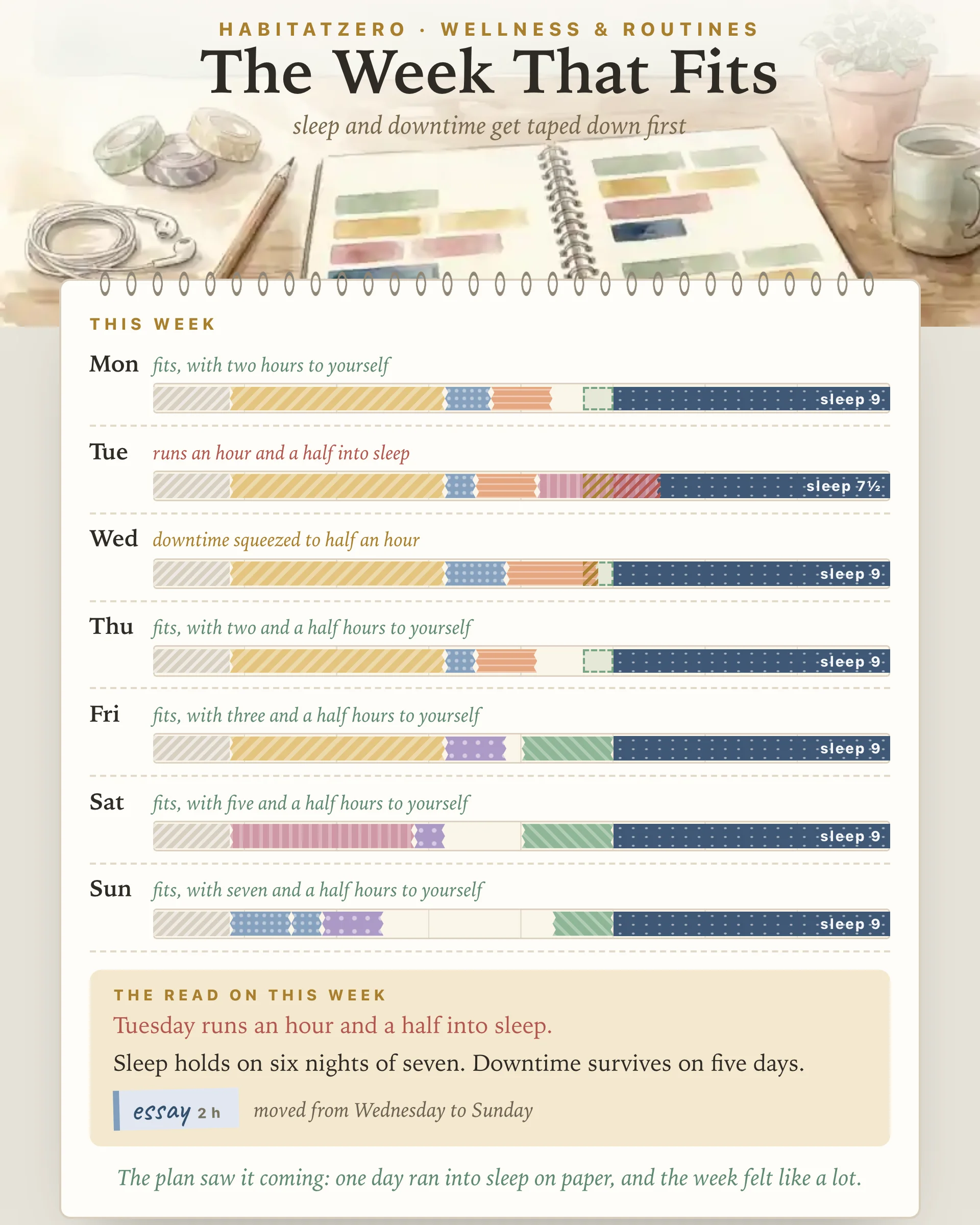
Most planners for teens work like a to-do list with dates across the top. You write "bio test Thursday," "shift four to eight" and "essay due Friday," and each one fits neatly on the page. The trouble is that the page has no idea how long anything takes. A Tuesday with school, practice, a four-hour shift and an hour of math looks as roomy as a Sunday, right up until it is eleven at night and the math has not started.
This planner measures the week in hours instead of lines. Each day is a strip of twenty-four hours, and everything you put on it is a piece of tape cut to length. When a day runs out of room, you can see exactly what the extra tape lands on.
Before any homework or practice goes on, three things are taped down on each day: sleep, a floor of downtime, and the everyday stuff (meals, getting ready, getting there). They go first because they are what a busy week takes without asking.
The sleep number is not a guess. The American Academy of Sleep Medicine recommends eight to ten hours in every twenty-four for teens aged thirteen to eighteen, and the American Academy of Pediatrics endorsed that statement. Most teens fall short of it. In a national CDC survey, nearly three in four high school students slept less than eight hours on school nights. That gap is rarely one big decision. It is a shift that ends at eight, a game that runs late, and homework that starts after both.
So the planner starts you at nine hours and lets you pick anywhere from seven to ten. Go under eight and it says so once, then leaves the choice to you.
Downtime gets a floor as well: an hour a day unless you change it. That hour is yours, for friends, a game, a show or staring at the ceiling. A planned downtime strip, like a movie night, sits inside that protected zone and widens it.
Tap the plus beside a day. Pick a tape (school, homework, practice, job, plans or downtime), tap a suggestion or write a short label, and set the hours in half-hour steps. "Also on" puts the same strip on several days at once, and "Mon to Fri" lays down a whole school week in a single tap.
The have-tos stack up from the left end of each strip. When they reach the downtime zone, the overlap is hatched in gold and the day tells you how much downtime is left. When they reach sleep, the hatching turns red and the day says how far: "runs an hour and a half into sleep." Nothing gets cut on your behalf. The strip only shows what the plan would cost.
Then you fix it the way you would on paper. Tap a strip to lift it, and you can move it to a lighter day, trim it by half an hour, or peel it off with two taps, so nothing vanishes by accident. A moved strip remembers where it started, and the read under the spread lists everything that moved.
That read also spells out how many hours are spoken for, which days run into sleep, how many nights keep your full sleep, and which days lose their downtime. On Sunday, the look back asks how the week actually went, what gave, and one thing you would change, then sets your answer beside what the plan predicted. When the week is done, it prints for the fridge.
Planning helps, though maybe not in the way the productivity videos promise. A 2021 meta-analysis found that time management is moderately linked with academic achievement, job performance and well-being, and that its tie to well-being, especially life satisfaction, is stronger than its tie to performance. The research it pools is mostly cross-sectional, so it shows a link rather than proof that planning causes the calm. Even so, that is a fair reason to plan: not to squeeze more into the week, but to stop being ambushed by it.
What the page cannot do is make a crowded week smaller. It can show you on Sunday that Tuesday does not fit, while there is still time to trade a shift or start the essay early.
Let your teen hold the tape. Be there on Sunday if they want company, but let them lay out the week and read the result to you. If a day runs into sleep, ask what they would move instead of moving it yourself. A plan they built is theirs, and the look back gives you both something more specific to talk about than "how was your week."
Sunday evening is the natural time, or the day a new practice schedule, work schedule or test date lands. When a big test is coming, pair this with the Exam Study Planner so the prep hours get a plan of their own. If the homework strips keep hiding a pile of small assignments, the Homework Planner tracks each one to the day it is done.
The one a teen actually opens on a Tuesday. Look for a weekly view with room for school, practice, work shifts and homework, and some way to see how many hours each day already holds. This one shows those hours as tape along a strip, so a day that is too full stands out before it arrives.
Start with the blocks that do not move: school, practices, games, rehearsals and shifts. Then place homework, test prep and big assignments on the days they will really get done, along with family plans. Sleep and some unscheduled time belong on the page as well, since a crowded week takes those first.
The American Academy of Sleep Medicine recommends eight to ten hours in every twenty-four for ages thirteen to eighteen, guidance the American Academy of Pediatrics has endorsed. This planner starts each night at nine hours and lets you set anywhere from seven to ten.
Plan alongside your teen rather than for them. Sit down together on Sunday if they want company, let them tape out the week, and read the result side by side. When a day runs into sleep, ask which strip they would move instead of moving it yourself.
The page itself shows a sample week that is already taped out. To lay out your own, carry it from one Sunday to the next and print it, personalize it in HabitatZero at no cost.
By the team behind Fabulous, the science-based self-care app used by over 30 million people.