The Overwhelm Recovery ProtocolWellness & Routines · ~5 min
About this template · Updated September 2026
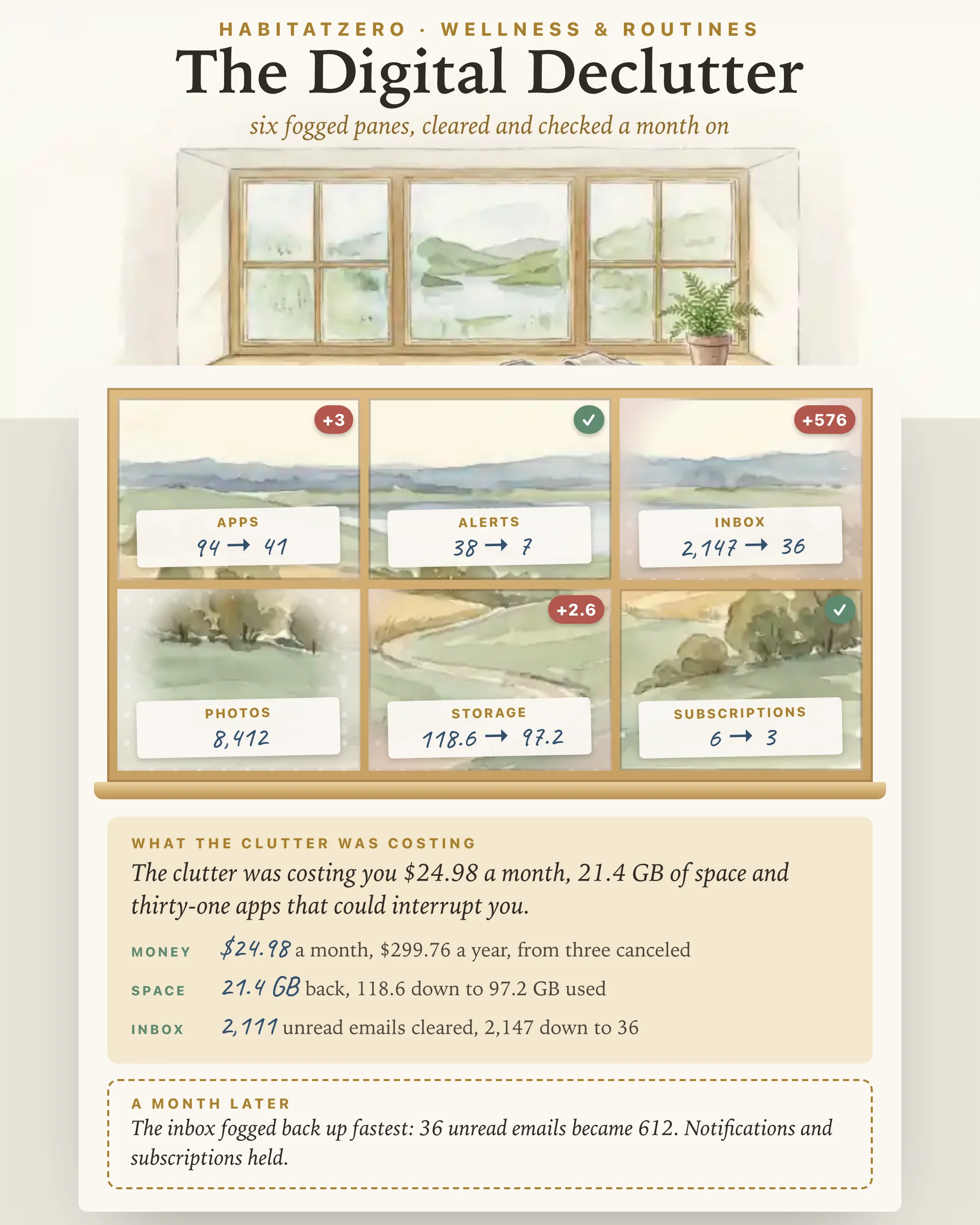
Two different projects share this name. The one most people mean, and the one this page is built around, is a cleanup: apps you never open, red badges, thousands of unread emails, old screenshots and subscriptions you forgot you were paying for. The other is Cal Newport's thirty-day digital declutter from his 2019 book Digital Minimalism, a month away from optional technology before you let any of it back in, which he describes in his own words on his site. This worksheet is independent of Newport, with no affiliation to him and no endorsement from him, and his version gets its own section further down.
Digital clutter hides because none of it takes up a shelf. It shows up as friction instead: a storage warning, an inbox you open and close without reading, a charge you cannot quite place. The worksheet splits it into six panes of one window:
Every pane starts fogged. Tap one, count what is in it (Settings shows most of these numbers, and a rough count of photos is fine), then work down its four moves. Each move you check off wipes a streak of the glass, and an after count lower than the first clears the pane.
Subscriptions work differently: list each plan, give it a monthly price and a verdict, keep or cancel, and the page adds up the canceled ones by the month and the year, exact to the cent.
Under the window, a costing card turns your counts into what the clutter was costing you: gigabytes back, dollars a month, apps that can no longer interrupt you. The page also gives you a date one month out. Count every pane again on or after it, and a rose-tinted fog creeps back over any pane that grew, with a red badge showing by how much. The pane that fogged back up fastest, measured against what you had cleared, gets named along with one habit to try.
That second count is what most checklists skip. A one-time cleanup feels good for a week; knowing which pane refills fastest shows where a standing rule earns its keep.
The notification pane has the clearest research behind it. In a study of 221 adults, Kushlev, Proulx and Dunn had people spend one week with alerts on and the phone within reach, and another week with alerts off and the phone put away. People reported more inattention and hyperactivity during the alerts-on week, and that inattention went with lower productivity and well-being. The experiment ran two weeks, relied on self-reported symptoms and changed two things at once, so it cannot say how much came from the alerts alone.
Why the clutter builds up has been studied too. In a qualitative study that asked 45 adults about their digital hoarding, Sweeten, Sillence and Neave found the same themes as in physical hoarding: emails, photos and files pile up, deleting them feels hard, and the pile itself stirs up anxiety. It was a small study, and keeping lots of files is not a diagnosis. Neither study shows that a tidy camera roll makes you happier, and this page does not claim it. The storage and the money need no study: a canceled subscription stops charging you, and freed space is simply space.
Newport's version is a reset rather than a cleanup. You spend thirty days away from the optional technologies in your life, use the month to rediscover what you like doing offline, and at the end bring back only the tools that clearly serve something you value, thinking through how you will use each one. He tested the process in January 2018 with more than 1,600 readers before writing it into the book. In his account, most people stopped missing the dropped apps after a week or so, and the harder part was knowing what to do with the free time.
The two fit together. Run the cleanup before the month starts, or on the day it ends, and let the month-later count here show what crept back once the apps returned.
Good moments: the week your phone warns that storage is full, the days before you trade in a device, the first week of January, or whenever the unread number starts to feel like a verdict. Set aside an unhurried hour. If the inbox is the pane that keeps fogging back up, pair this page with Inbox Zero Routine. If the trouble is how late the phone stays in your hand rather than what is on it, Evening Digital Detox handles the screens after dark. And when the clutter is the kind you can trip over, Decluttering Checklist brings the same count-and-clear habit to one area of your home at a time.
It is a planned clean-out of the places your devices collect clutter: apps you never open, notifications, unread email, old photos and screenshots, full storage and forgotten subscriptions. The same phrase also names Cal Newport's thirty-day break from optional technology, which the article on this page covers in its own section.
Start with the six places that fill fastest: the apps on your phone, the apps allowed to notify you, the inbox, the photo library, device storage and every paid subscription. Count each one before and after, so the difference is something you can see instead of a feeling.
Read two months of card and bank statements for repeat charges, then open the subscriptions list in your phone's app store, which catches plans billed through Apple or Google. Searching your email for the words renewal and receipt turns up most of the rest. Give each one a verdict before moving on.
No. This worksheet is independent and has no affiliation with Cal Newport or endorsement from him. His digital declutter is a thirty-day break from optional technology, described in his book Digital Minimalism; the six panes here are a practical cleanup you can run on its own or next to his month.
Reading the page and browsing the filled example need no account. To count your own panes, keep the numbers and come back for the month-later check, open the worksheet in HabitatZero, which costs nothing.
By the team behind Fabulous, the science-based self-care app used by over 30 million people.