ADHD Daily Task OrganizerFocus & ADHD · ~10 min
About this template · Updated September 2026
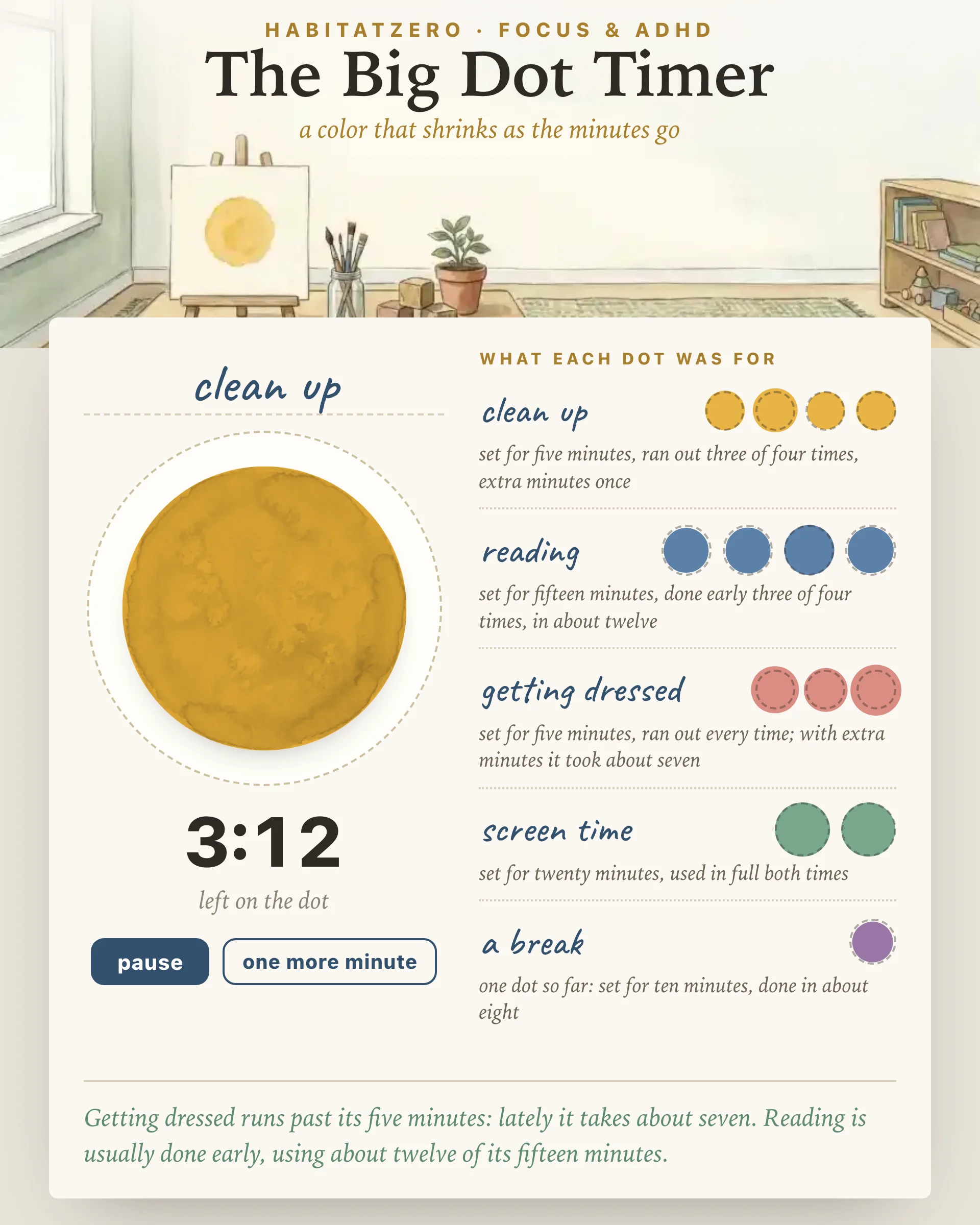
Time is hard to see. A five-minute warning means little to a six-year-old, and "ten more minutes" can feel like two or like twenty to an adult with ADHD. Digits only help once you already know how long a minute feels. This page shows the minutes instead: a painted dot that shrinks as they pass, big enough to read from across a room, and quiet unless you ask it for a sound.
A countdown in numbers has to be read and then turned into a sense of how much is left. A dot skips that step. When most of the color is gone, most of the time is gone, and a child who cannot read a clock yet understands that as quickly as the teacher does.
That matters most for people who struggle to track time on their own. A meta-analysis of twenty-seven studies found that children and teens with ADHD judged time less accurately and less precisely than their peers, and more often overestimated how long an interval lasted. Visual supports, meanwhile, are one of the twenty-eight practices a large review counted as evidence-based for autistic children and youth. That review looks at visual supports broadly, such as schedules and picture cues, rather than at timers alone. A timer you can see belongs to the same family, because it puts the information outside the head, where anyone can check it with a glance.
Pick two, five, ten, fifteen, twenty or thirty minutes, or nudge the length one minute at a time up to an hour. Write what the dot is for on the line above it, or tap a label such as clean up, reading or screen time, and choose one of five paints.
Once it starts, the dot shrinks by area rather than by width, so when half the time is gone, half the color is gone. A dotted ring marks the halfway point. A dot that shrank by width would look three-quarters empty at the halfway mark, and an honest shape matters when a child is deciding whether to hurry.
The timer is measured against the clock rather than against the page staying open, so switching tabs or putting a tablet down does not throw it off. You can pause for an interruption, give one more minute when a job is nearly finished, press done when it ends early, or reset it with two taps. Fill the screen clears away everything but the name, the dot, the time and a few large buttons, which suits a projector; Escape brings the page back.
It is silent by default. If you want a signal, switch on the chime: three soft notes, made in the browser, sounding once when the dot runs out. The same button mutes it again.
Every named dot you finish files itself in a row under that name. Each small ring is the length you set, and the color inside is the time actually used. A dot that ended early sits inside its ring; one that needed extra minutes spills past it.
After a week, the rows answer a question that memory answers badly: how long each job really takes. Planning research suggests that people base their time estimates on memories of past tasks, and those memories run short, which helps explain why the same job keeps overrunning the same guess. A written record does not shrink in hindsight. If getting dressed took about seven minutes on three mornings you had set for five, its row says so, and one tap loads seven for tomorrow.
The record keeps eight rows and the last six dots in each, so it stays short enough to read in one look.
Give the warning before the end rather than at it: when the dot is the size of a cookie, start packing up. Name the next activity as well as the current one, so the end of the dot points somewhere. Use the timer to show time, never as a threat; a dot that turns into a punishment stops being read as information. For a routine with several steps, pair the dot with the Kids Daily Routine Chart. To practice waiting, The Token Board gives the wait a reward at the far end.
The same dot works on a desk. Ten minutes on the email you keep avoiding, twenty on the dishes, five to decide on dinner. If you want work sprints with room to drift and start over, Sand Timer Sprints is built for that. This page is for watching time pass and learning what your own minutes go to.
The studies above describe averages across groups of people. None of them shows that a shrinking dot will make every transition smooth or every task start on time, and no timer treats ADHD, autism or anything else. Think of this as a tool to test in your own home or classroom, with the record as the place where the test results pile up.
A timer that shows time as a shape instead of digits. On this one a colored dot shrinks as the minutes pass, so anyone in the room can see how much is left at a glance, including a child who cannot read a clock yet.
Name the activity so it shows above the dot, press fill the screen on the projector or a tablet facing the class, and tell students what happens when the color is gone. The page stays quiet by default, and an optional three-note chime has a mute button right beside the dot.
It can make time easier to track. Studies comparing children with and without ADHD find that, on average, those with ADHD judge time less accurately, so a clock you can see does part of that judging for you. It supports planning and transitions; it is not a treatment.
Shorter than you think for the first tries: two to five minutes for a cleanup or a transition, ten or fifteen for reading or homework. A five minute visual timer is a good default. The record on this page then shows which jobs need more and which need less.
The public page shows a sample dot and a sample record. Running dots, naming them and keeping the record happens when you personalize the timer in HabitatZero, which costs nothing.
By the team behind Fabulous, the science-based self-care app used by over 30 million people.